Pixel House Game Time
⏱️ Pixel House Game Time for GDevelop
A powerful, flexible and beginner-friendly game time engine for GDevelop.
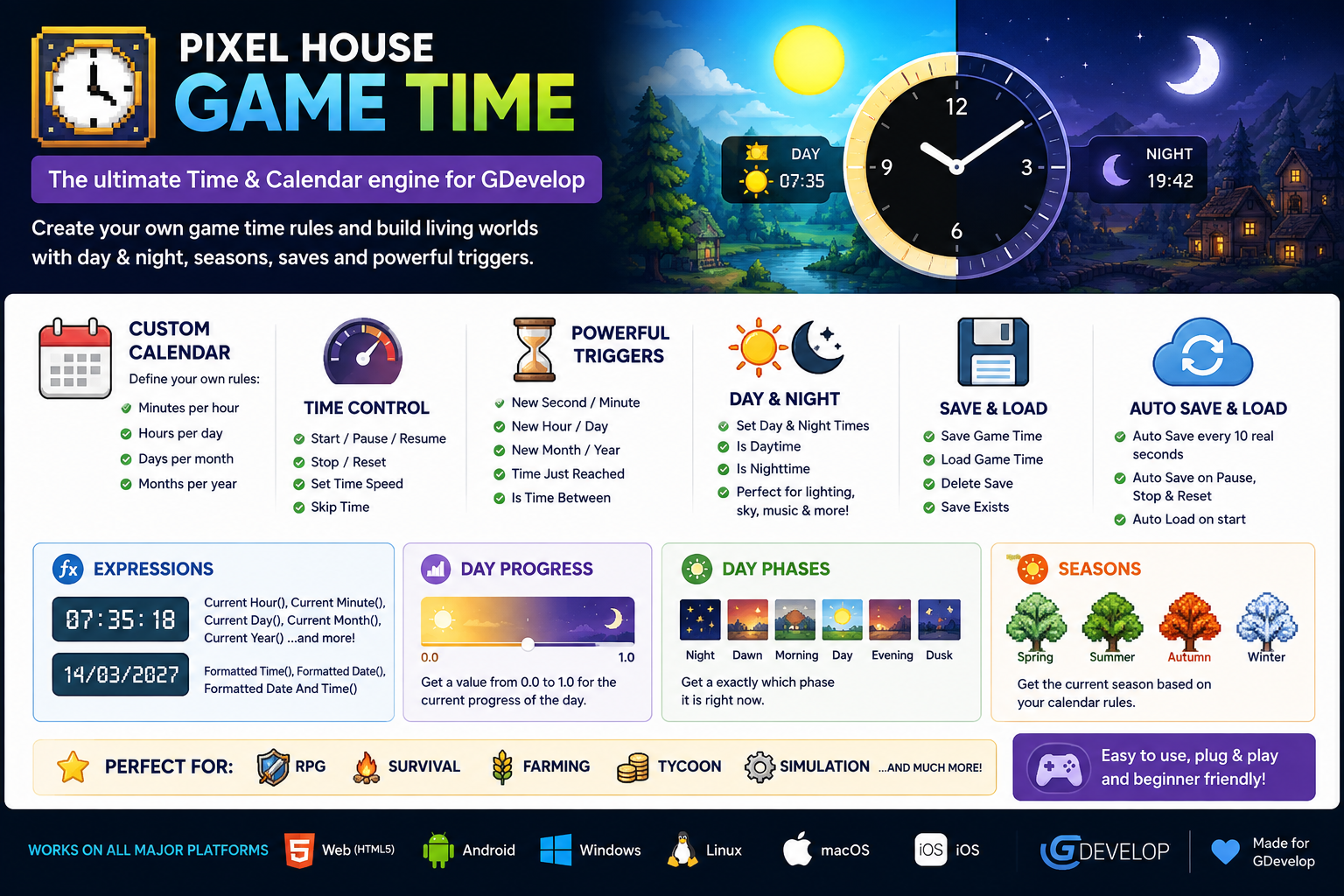
Pixel House Game Time gives your game its own clock, calendar and timeline — without having to build complicated systems with timers, variables and event logic yourself.
Create a familiar 24-hour world or design a completely fictional calendar for a fantasy planet, alien world or simulation.
Control the speed of time, skip hours or entire years, react to specific dates, create day/night gameplay and automatically save and restore the current game time.
Perfect for
RPGs • Farming Games • Survival • Simulations • Tycoons • RTS • Open World • Adventure • Fantasy • Science Fiction
🌍 More Than a Simple Day/Night Cycle
Pixel House Game Time manages a complete in-game timeline:
- Seconds
- Minutes
- Hours
- Days
- Months
- Years
- Custom calendar rules
- Adjustable time speed
- Time skipping
- Time triggers
- Time conditions
- Day & night
- Save & Load
- Auto Save
- Auto Load
The goal is simple:
Make complex game-time systems easy to use.
🪐 Create Your Own Calendar
Your game does not have to use Earth's calendar.
When creating the Game Time, you can define your own rules, including:
- Starting second
- Starting minute
- Starting hour
- Starting day
- Starting month
- Starting year
- Minutes per hour
- Hours per day
- Days per month
- Months per year
- Real seconds per game minute
For example, you could create a familiar world:
60 minutes → 24 hours → 30 days → 12 months
Or create an alien planet:
80 minutes → 30 hours → 20 days → 8 months
Pixel House Game Time automatically handles the timeline according to your rules.
This makes the extension suitable not only for realistic games, but also for fantasy and science-fiction worlds with completely fictional calendars.
🚀 Quick Start
Getting a Game Time running is intentionally simple.
At the beginning of your scene, use:
Create Game Time
Then continuously use:
Update Game Time
That's enough to get the clock running.
Want persistent game time as well?
Enable:
Auto Save: Yes
Auto Load: Yes
The extension can then automatically save and restore the Game Time for you.
🎮 Actions
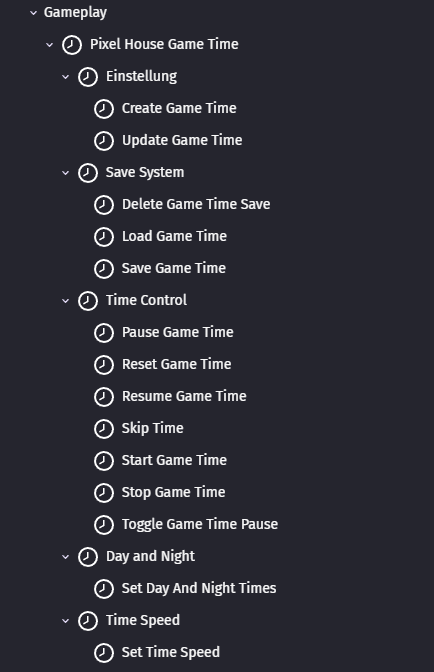
Actions control and modify your Game Time.
⚙️ Setup
Create Game Time
Creates and initializes the Game Time system.
This is where you define the starting date and time, your calendar rules, the basic time conversion and the optional Auto Save / Auto Load behavior.
Usually, this is the first Game Time action you use when starting a scene.
Update Game Time
Updates the running Game Time.
Use this continuously while your Game Time should progress.
The extension takes care of converting elapsed real time into your configured game time.
⏯️ Time Control
Start Game Time
Starts the Game Time.
Useful when the clock has previously been stopped.
Pause Game Time
Temporarily pauses the Game Time.
For example:
Player opens pause menu → Pause Game Time
The current date and time remain unchanged until the Game Time is resumed.
Resume Game Time
Continues a paused Game Time.
Example:
Player closes pause menu → Resume Game Time
Toggle Game Time Pause
Automatically switches between paused and running.
This is useful for a single pause button:
Press P → Toggle Game Time Pause
No separate pause/resume logic is necessary.
Stop Game Time
Stops the Game Time.
It can later be started again using Start Game Time.
Reset Game Time
Returns the Game Time to its original starting date and time.
Useful for:
- Restarting a game
- Restarting a level
- Testing
- Reset systems
⏩ Skip Time
One of the most useful actions in the extension.
Skip Time instantly moves the timeline by a specified amount.
You can skip:
- Seconds
- Minutes
- Hours
- Days
- Months
- Years
Example: Sleeping
The player sleeps for eight hours:
Skip Time → 8 Hours
Example: Fast Travel
A journey takes two days and four hours:
Skip Time → 2 Days + 4 Hours
Example: Time Travel
You can also move backwards through time using negative values.
This makes Skip Time useful for much more than sleeping or travelling — it can even become part of the gameplay itself.
⚡ Time Speed
Set Time Speed
Change how fast Game Time progresses.
Any multiplier can be used.
For example:
0.5 → Half speed
1 → Normal speed
2 → Double speed
3.7 → 3.7× speed
10 → 10× speed
100 → 100× speed
This is especially useful for simulations and games with fast-forward controls.
For example:
Normal gameplay → 1×
Fast forward → 5×
Very fast simulation → 20×
☀️🌙 Day and Night
Pixel House Game Time includes a configurable day/night system.
Set Day And Night Times
Define when daytime begins and when nighttime begins.
For example:
Day starts → 06:00
Night starts → 20:00
Or:
Day starts → 08:30
Night starts → 18:45
You decide what makes sense for your world.
The system also works with custom calendars using different numbers of hours and minutes.
💾 Save System
Pixel House Game Time includes a built-in save system using GDevelop Storage.
You do not need to build a separate variable-based save system just for the clock.
Save Game Time
Manually saves the current Game Time state.
The extension preserves important information such as the current timeline, calendar configuration, time speed and other Game Time settings.
Perfect for:
Save Game → Save Game Time
Load Game Time
Loads a previously saved Game Time.
Manual loading restores the saved Game Time state.
Delete Game Time Save
Deletes the stored Game Time data.
Useful for:
- New Game
- Delete Save
- Reset Profile
- Testing
☁️ Auto Save
Auto Save can be enabled directly when using Create Game Time.
When enabled, the extension automatically saves the Game Time:
- Every 10 real seconds while Game Time is running
- When Game Time is paused
- When Game Time is stopped
- When Game Time is reset
Manual Save Game Time remains available at any time.
🔄 Auto Load
Auto Load can also be enabled directly in Create Game Time.
When the Game Time is created, the extension checks for an existing save.
Save found?
→ The saved Game Time is automatically restored and continues running.
No save found?
→ The configured starting date and time are used.
This makes persistent Game Time especially easy for beginners.
In many projects, simply enabling:
Auto Save: Yes
Auto Load: Yes
is enough.
❓ Conditions
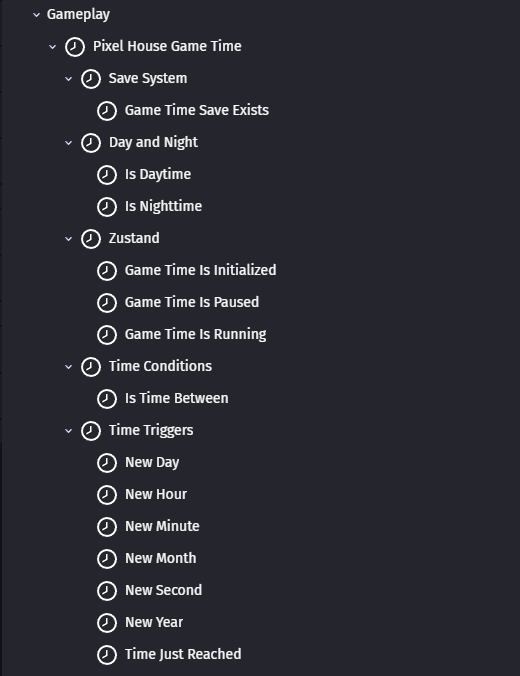
Conditions allow your GDevelop events to react to the current state or timeline.
🔧 State Conditions
Game Time Is Initialized
Checks whether the Game Time system has been successfully created.
Useful when other events should only run after Create Game Time.
Game Time Is Running
Checks whether Game Time is currently running.
Example:
Game Time Is Running → Update time-dependent gameplay
Game Time Is Paused
Checks whether the Game Time is currently paused.
Useful for pause menus or UI elements.
🔔 Time Triggers
These conditions make it easy to react when the timeline changes.
New Second
Triggered when a new game second begins.
New Minute
Triggered when a new game minute begins.
Example:
New Minute → Update a production system
New Hour
Triggered when a new game hour begins.
Example:
New Hour → Update shop inventory
New Day
Triggered when a new game day begins.
Perfect for:
- Crop growth
- Daily rewards
- Rent
- Salaries
- Daily quests
- NPC routines
Example:
New Day → Grow crops
New Month
Triggered when a new game month begins.
Example:
New Month → Charge monthly expenses
New Year
Triggered when a new game year begins.
Perfect for long-running simulations or strategy games.
🎯 Time Just Reached
Time Just Reached lets you react when a particular point in the timeline is reached.
You can specify:
- Year
- Month
- Day
- Hour
- Minute
- Second
Values you do not care about can be ignored using the wildcard value supported by the condition.
Example
Trigger an event when the game reaches a particular year.
Or create an event that happens at a particular time of day.
This condition is especially useful for:
- Story events
- Appointments
- Quests
- Festivals
- Scheduled attacks
- Special events
- Scripted world changes
An important advantage is that the system can recognize relevant timestamps even when time moves forward in larger steps.
This makes it work naturally together with Skip Time.
🕒 Time Conditions
Is Time Between
Checks whether the current time is inside a specified daily time range.
For example:
06:00 → 20:00
could represent normal daytime gameplay.
Ranges that cross midnight are supported as well.
For example:
20:00 → 06:00
This is extremely useful for:
- Shop opening hours
- NPC schedules
- Night enemies
- Lighting systems
- Music changes
- Restricted areas
- Time-based quests
☀️ Is Daytime
Checks whether the current Game Time is within the configured daytime period.
Example:
Is Daytime → Enable daylight
or:
Is Daytime → Open daytime shops
🌙 Is Nighttime
Checks whether the current Game Time is within the configured nighttime period.
Example:
Is Nighttime → Spawn night enemies
or:
Is Nighttime → Turn on street lights
💾 Game Time Save Exists
Checks whether a valid Game Time save exists.
This is especially useful for menus.
For example:
Game Time Save Exists → Show "Continue Game"
If no save exists, the Continue option can remain hidden or disabled.
🔢 Expressions
Expressions give you direct access to the current Game Time values.
They can be used anywhere GDevelop accepts an expression.
CurrentSecond()
Returns the current game second.
CurrentMinute()
Returns the current game minute.
CurrentHour()
Returns the current game hour.
Example:
Display the current hour in your HUD.
CurrentDay()
Returns the current game day.
Useful for displaying:
Day 14
or for your own gameplay systems.
CurrentMonth()
Returns the current game month.
CurrentYear()
Returns the current game year.
Perfect for simulations or games covering long periods of time.
TimeSpeed()
Returns the currently active time-speed multiplier.
For example, this can be used to display:
Time Speed: 5×
in a simulation interface.
💡 Example: Farming Game
Pixel House Game Time can manage the complete timeline behind a farming game.
For example:
New Day
→ Grow crops
Is Daytime
→ Shops are open
Is Nighttime
→ Player can sleep
Player chooses to sleep:
Skip Time → 8 Hours
The Game Time moves forward automatically.
💡 Example: Survival Game
During the day:
Is Daytime
→ Normal enemies
At night:
Is Nighttime
→ Spawn dangerous enemies
→ Change lighting
→ Turn on street lights
No separate day/night timer is necessary.
💡 Example: Tycoon or Simulation
Use:
New Hour
→ Calculate production
New Day
→ Pay salaries
New Month
→ Pay rent
And give the player simulation controls using:
Set Time Speed
For example:
1× · 2× · 5× · 10×
💡 Example: Fantasy or Alien World
You are not limited to Earth.
Create a world with:
80 minutes per hour
30 hours per day
20 days per month
8 months per year
All Game Time calculations automatically follow those rules.
Your game world can have its own definition of time.
🎮 Designed for GDevelop
Pixel House Game Time was designed around one principle:
Powerful systems should still be easy to use.
Instead of manually managing many variables, timers, calendar calculations and save data, the extension handles the underlying Game Time logic for you.
The API is divided into clear categories:
Setup
Time Control
Time Speed
State
Current Time
Time Triggers
Time Conditions
Day and Night
Save System
This keeps even larger projects organized and easy to understand.
🌐 Cross-Platform
Pixel House Game Time is designed for GDevelop's cross-platform environment.
Use it in projects targeting:
Windows
Linux
macOS
Android
iOS
Web / HTML5
No platform-specific Game Time implementation is required.
⭐ Main Features at a Glance
⏱ Complete Game Time Engine
Seconds, minutes, hours, days, months and years.
🌍 Custom Calendars
Define how time works in your own world.
⚡ Adjustable Time Speed
Slow down or accelerate your simulation.
⏩ Skip Time
Jump through seconds, hours, days or even years.
🔔 Built-in Time Triggers
React to new seconds, minutes, hours, days, months and years.
🎯 Scheduled Events
React when important dates and times are reached.
☀️🌙 Day/Night System
Define your own daytime and nighttime.
💾 Save & Load
Store and restore the complete Game Time.
☁️ Auto Save
Automatically preserve the current Game Time.
🔄 Auto Load
Automatically continue from a previous session.
🪐 Fantasy & Sci-Fi Ready
Your world does not have to follow Earth's calendar.
🧩 Beginner Friendly
Complex functionality with a simple GDevelop API.
❤️ Made for Game Developers
Whether you need a simple clock for an RPG or a complete timeline for a large simulation, Pixel House Game Time gives you a flexible foundation without forcing you to build the entire system yourself.
Spend less time building clocks and calendar logic.
Spend more time building your game.
⏱️ Pixel House Game Time
Build your world. Define its calendar. Control its time.
Purchase
In order to download this tool you must purchase it at or above the minimum price of 2.39€ EUR. You will get access to the following files:
Leave a comment
Log in with itch.io to leave a comment.